
Tizi Modern Home & Room Design
Tizi Town GamesEducational
4.2240.00 Reviews
- Version
- 2.1.2
- Installs
- 10.00M
- Age Rating
- Everyone
Screenshots
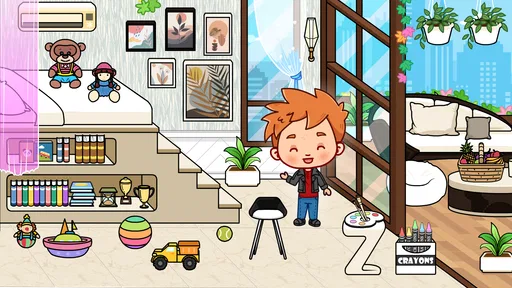


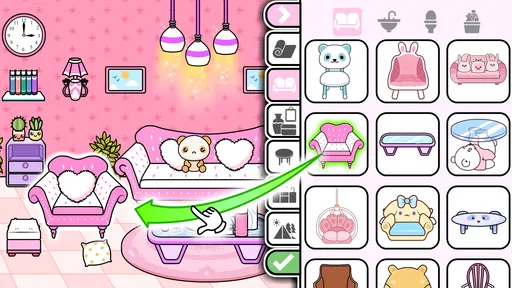
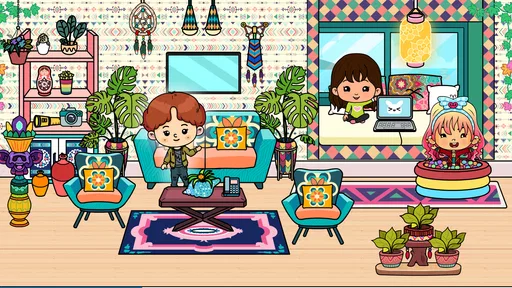
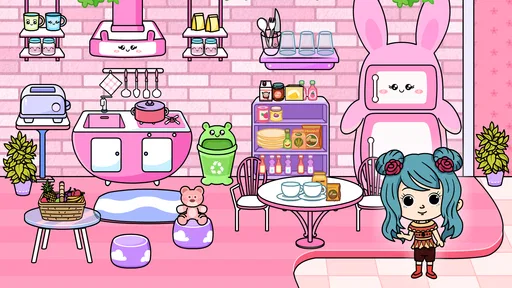
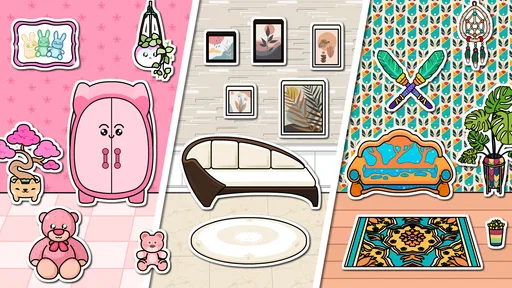
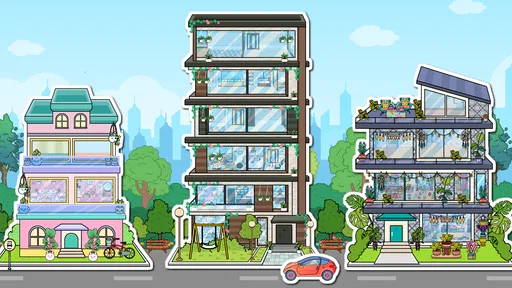
Our Review of Tizi Modern Home & Room Design
 Analysis by Appyee
I approached Tizi Modern Home & Room Design expecting a simple decorating game, and that is exactly where its appeal lies. It gives me a relaxed digital house to arrange with modern furniture and colorful room details, without turning the experience into a complicated building simulator. My overall view is positive: this is a friendly, low-pressure choice for children and casual players who enjoy making spaces look different, but it is less suitable for anyone looking for deep strategy, challenging puzzles, or a detailed interior-design tool.
The game comes from Tizi Town Games and sits in the educational category, although I would describe its learning value as informal rather than academic. It encourages visual choices, organization, imagination, and simple cause-and-effect thinking. The basic pleasure comes from looking at a room, deciding what kind of atmosphere it should have, and gradually making it feel more personal. That makes it easy to pick up during a short break, especially when I want something creative rather than competitive.
How the decorating experience works in everyday use
The strongest part of the experience is its approachable design. I do not need to study a long tutorial or understand a complicated economy before doing anything useful. The central activity is choosing furniture and decorative elements for a modern home, then experimenting until the rooms feel balanced. The colorful presentation makes the game immediately understandable, which is important for younger players who may not have the patience for menus packed with technical options.
I also like that the game leaves room for different interpretations of a “good” room. One player may prefer a bright, playful space with contrasting colors, while another may choose a calmer arrangement with matching pieces. That freedom gives the activity more value than simply tapping through a fixed sequence. It becomes a small creative exercise: compare shapes, notice how colors sit together, and decide which objects belong in the same setting.
A realistic use case is a child playing for a few minutes after school while a parent is preparing dinner. There is no need to commit to a long session or remember a complicated objective. The player can enter, adjust a room, try another arrangement, and stop when the result feels finished. I find that short-session structure more useful than games that demand constant progress, particularly for families who want an activity that can be paused easily.
Another practical use is shared play between an adult and a child. Instead of simply watching the child tap the screen, I can ask why a certain piece belongs in a room, whether two colors work together, or what kind of person might live there. Those questions turn the decorating process into conversation. The app does not need to announce itself as a lesson for it to support basic creative thinking and vocabulary around homes, colors, furniture, and personal taste.
Why the visual freedom matters
The game’s modern-home theme gives it a clearer identity than a completely open-ended coloring activity. Furniture and room decoration provide a framework, so I am not starting with an empty canvas and wondering what to do. At the same time, the colorful style keeps the setting light and accessible. That balance is one of the reasons I would recommend it to a child who enjoys dollhouse-style play but may not be ready for a more demanding simulation.
There is also a useful difference between decorating and merely collecting. When I place an item, I am making a visible decision about a room rather than only chasing a score. That can make the game feel calmer and more personal. Players who enjoy arranging objects, changing themes, and imagining stories around a home will probably get more from it than players who need constant rewards or a clear competitive target.
My advice is to treat each room as a small design challenge. Before placing everything immediately, choose a mood first: cheerful, calm, playful, or polished. Then select the larger furniture pieces and use colorful details afterward. This simple order makes the result look more intentional and helps younger players understand that decoration works best when the main arrangement comes before the small accents.
A second useful approach is to make one deliberate “messy” version before creating a tidy one. Put items in unusual places, compare the result, and then move them back. That experiment shows how spacing and grouping change the feeling of a room. It is a small but worthwhile way to get more creative value from the game instead of treating every object as something that must be placed as quickly as possible.
The limits behind the friendly presentation
The same simplicity that makes the game welcoming can also make it feel shallow. Players who want realistic measurements, detailed construction, professional planning tools, or a large set of rules will probably outgrow it quickly. This is not the kind of experience I would use to plan a real renovation. It is better understood as imaginative room play with a modern-home setting.
I also would not choose it for someone who needs a strong sense of progression. A decorating game can become repetitive when the main activity remains arranging visual elements without a deeper challenge. If you prefer puzzles with increasing difficulty, resource management, timed objectives, or competitive rankings, a conventional puzzle or simulation game will likely hold your attention for longer.
There is another trade-off around the free entry point. The game is free to download, but in-app purchases are listed at $1.99 per item. That does not automatically make the experience poor, yet it is something families should consider before handing the device to a child. I would set expectations clearly: the free experience is the place to decide whether the decorating loop is enjoyable, while optional purchases can affect how much content a player wants to access.
For that reason, I would not describe the game as an unlimited design studio. Its value depends on how much enjoyment the player gets from rearranging and imagining, rather than on the amount of technical control available. If a child loses interest once the first few rooms look finished, that is not a sign the game has failed; it simply means the core activity may not match that child’s preferred style of play.
Who should install it, and who should skip it
I think it is a good fit for children and families searching for a gentle educational game built around creativity instead of tests or memorization. The Everyone content rating makes its intended audience broad, and the colorful home-design theme is easy to understand even for players who do not usually play games. It may also suit adults who enjoy casual decorating and want something uncomplicated rather than a full interior-design simulator.
It is especially appropriate for players who like dollhouses, room makeovers, fashion-style color matching, or arranging objects into pleasing groups. The appeal is not limited to children who already know about design. In my experience, the game works because it lets the player learn through trial and error: move something, look at the result, and decide whether the room feels better or worse.
I would be more cautious about recommending it to older players who expect sophisticated customization. Someone looking for architectural planning, exact layouts, realistic materials, or a large strategic system should choose a more specialized alternative. Likewise, players who need action, narrative drama, or a demanding objective structure may find this experience too quiet.
Compared with a standard coloring app, this game offers a stronger sense of place because the player is arranging a home rather than filling isolated shapes. Compared with a full life simulation, however, it is much lighter and less involved. That middle position is important: it gives children a structured creative activity without asking them to manage a character, budget, schedule, or complicated virtual household.
Compared with a professional room-planning application, it is clearly more playful and less precise. That is a weakness if accuracy matters, but a strength if the goal is quick experimentation. I would choose this game for imaginative play and choose a design tool for measurements or renovation decisions. Mixing up those purposes would lead to disappointment.
Device expectations and version details
The game supports devices running Android 7.0 or later, so it is not restricted to only the newest phones and tablets. The current version is 2.1.2. I would still keep the device’s available storage and screen comfort in mind, especially when a younger child will be using it for extended decorating sessions. A larger tablet screen can make arranging a room easier because the visual details are more comfortable to inspect.
Its popularity also gives me some confidence that the concept has reached a substantial audience. The game has passed 10 million installs and holds a 4.2 average from around 25 thousand ratings. Those figures do not guarantee that every player will enjoy it, but they support the impression that this is an established casual title rather than an obscure experiment.
The listing shows 240 reviews, and I would read that kind of feedback alongside my own expectations rather than treating the average as a promise. A rating can tell me whether the broad audience is satisfied, but it cannot answer the more personal question of whether I want a calm decorating activity or a deeper game. The important distinction here is between popularity and fit.
The game was released on April 29, 2024, and it remains free to start. For a parent, I would regard the free installation as a useful trial rather than assuming the whole experience will remain cost-free. Since individual in-app purchases are shown at $1.99, it is sensible to decide in advance whether optional content is acceptable and to avoid letting a child make purchase decisions without supervision.
Small habits that make the game more enjoyable
My first recommendation is to take screenshots of favorite room arrangements if the device allows it. A player can use them as a personal record of different ideas, such as a bright room, a balanced room, and a deliberately unusual one. This adds a sense of progression even when the game itself is not focused on competition or formal achievement.
My second recommendation is to give each decorating session a simple theme. Try a room meant for a lively family, a quiet reader, or someone who loves bold colors. Inventing a resident gives every placement a reason and helps prevent the activity from becoming random tapping. It also creates an easy storytelling exercise for younger children, who can explain what happens in the home they have arranged.
A third tip is to pause before buying anything optional. First decide whether the available decorating loop remains enjoyable after several short sessions. If the player is still experimenting and creating new arrangements, a purchase may feel worthwhile; if the rooms already feel complete, spending more may not add much value. This is a practical way to separate genuine interest from the temporary excitement of seeing extra items.
I would also encourage adults to let children make imperfect choices. It can be tempting to correct every color combination or move furniture into an arrangement that looks more polished, but the game is more valuable when the child owns the result. Asking questions works better than giving instructions: “What do you like about this room?” or “What would you change next?” That approach turns decoration into an exercise in explaining decisions.
My final recommendation
After spending time with it, I see Tizi Modern Home & Room Design as a pleasant creative toy rather than a deep simulation. Its best qualities are the approachable modern-home setting, the colorful decorating focus, and the freedom to experiment without pressure. The educational value comes from making choices, comparing arrangements, and expressing personal taste, not from formal lessons.
The limitations are just as clear. The experience may become repetitive for players who need constant goals, and it does not replace a serious design application. The free starting point is attractive, but the $1.99-per-item purchases mean families should keep an eye on spending expectations. Those points do not ruin the game; they simply define the audience it serves best.
I would recommend it to a child who enjoys room makeovers, a parent looking for a calm shared activity, or a casual player who wants a few minutes of creative play on an Android device. I would skip it in favor of a deeper simulation or a professional planner if precise control, realism, or long-term challenge matters more than easy decoration.
My verdict is straightforward: choose it for relaxed imagination, not demanding gameplay. If that sounds like the experience you want, the free entry point makes it easy to try. Just approach it as a colorful home-arranging playground, set sensible boundaries around optional purchases, and let the player’s own ideas—not technical realism—be the measure of success.
Verdict
Strengths of Tizi Modern Home & Room Design
- Large catalog of modern furniture, décor, and room layouts
- Easy tap-and-place controls make decorating accessible for beginners
- Useful inspiration for bedrooms, living rooms, kitchens, and more
- Color and furniture combinations can be customized to match your style
- Offline play is convenient for designing without a constant connection
Limitations of Tizi Modern Home & Room Design
- Many attractive items and features may require in-app purchases
- Frequent ads can interrupt the decorating experience
- Design options may feel limited compared with professional room planners
- Some layouts prioritize playful visuals over realistic interior measurements
- Progress and available content can feel repetitive after extended play
Other Releases by Tizi Town Games
View All
Tizi Town - Pink Home Decor
Educational3.9

My Hospital Town Doctor Games
Educational3.5

Tizi Cute Kitty: Pet Cat Games
Educational3.2
Similar Picks in This Category
View All
Little Panda Policeman
BabyBus4.0

Monster Trucks Game for Kids 2
Raz Games4.1

Little Panda's Chinese Recipes
BabyBus4.4

Little Panda's Restaurant
BabyBus4.4

Little Panda's Ice Cream Games
BabyBus4.3

Baby Panda Care
BabyBus3.8
Frequently Asked Questions
What is Tizi Modern Home & Room Design?
Tizi Modern Home & Room Design is a casual interior-design game where you decorate rooms, apartments, and modern homes using furniture, decorations, colors, and different layouts. It is designed for players who enjoy creative play rather than complex strategy. You can experiment with themes and arrangements while completing design activities in a colorful, family-friendly environment.
How do you play Tizi Modern Home & Room Design?
Gameplay mainly involves exploring rooms, selecting objects, and placing furniture or decorations in suitable areas. You can interact with different parts of the home, change the appearance of spaces, and create your own room designs. The controls are simple and touch-based, making the game accessible to children and casual players who may not have experience with simulation games.
Is Tizi Modern Home & Room Design free to download and play?
The game is generally available as a free download, but some content may be supported by advertisements or optional in-app purchases. Depending on the version and device, certain furniture items, locations, or activities may require additional purchases or watching ads. It is a good idea to review the store listing and parental settings before downloading, especially if children will be playing.
Is Tizi Modern Home & Room Design suitable for children?
Tizi Modern Home & Room Design is aimed primarily at children and families, with colorful visuals, straightforward interactions, and non-violent creative gameplay. However, parents should still check the age rating, advertising policy, and in-app purchase options on the relevant app store. If the game is used by younger children, enabling device-level purchase restrictions can help prevent accidental spending.
Can Tizi Modern Home & Room Design be played offline?
Many of the basic decorating activities may work without a constant internet connection, but offline availability can vary by device, app version, and feature. Advertisements, purchases, updates, and some content may require internet access. For the most reliable experience, launch the game online after installation and check whether the rooms and activities you want to use remain accessible when the device is disconnected.
Play our best games!


